
When Axios journalist Ina Fried uploaded a photo of her cat Raven to ChatGPT's new image engine last week, she asked for something that would have been technically messy just months ago: transform this specific cat — with her specific "wonderfully unimpressed expression" — into a film noir detective, a stained-glass window, and a Renaissance portrait, all while keeping her recognizable. The results were good enough that one output correctly labeled Raven's eyes as a "gaze of judgment" and her brain as a "treat detection organ."
That is not a party trick. It is a demonstration of the thing that image AI has historically failed at most visibly: keeping a subject's identity intact across a style transfer.
GPT Image 2.5, which OpenAI launched on September 8, 2026, makes a serious push at that problem — and it changes the calculus for anyone working with reference images. Here is what actually changed, where the new model still has limits, and when a dedicated image-to-image AI generator still gives you an edge.
What Changed in GPT Image 2.5
The headline number is speed. OpenAI says generation latency is down by up to 50% compared with Images 2.0. Independent testing by Manus found Flare — the default API variant — delivering high-quality images at two to four times the speed of the previous model. That matters less for casual use and more for workflows where you are iterating across multiple rounds, or generating at volume.
The two API variants tell you something about how OpenAI sees the model's jobs. GPT-Image-2.5 Flare is the default: fast, suited to high-volume social content and rapid prototyping. GPT-Image-2.5 Sunburst is the precision mode: slower by roughly 1.5–2x, but built for production-ready campaigns and multi-turn editing where each revision needs to land exactly where you pointed it. Both variants are priced identically to their predecessors at $30 per million output image tokens.
The reference-subject preservation is the more consequential improvement. OpenAI says the model is better at keeping distinctive features from reference images — the shape of a face, a product's geometry, the recognizable markings of a pet — while still applying requested style changes. The Axios test showed this working convincingly on the cat photo; OpenAI's own release materials demonstrated it with a product shot, a dog in a stunt costume, and a full-body portrait sequence where successive edits tracked consistently across multiple rounds without drifting.
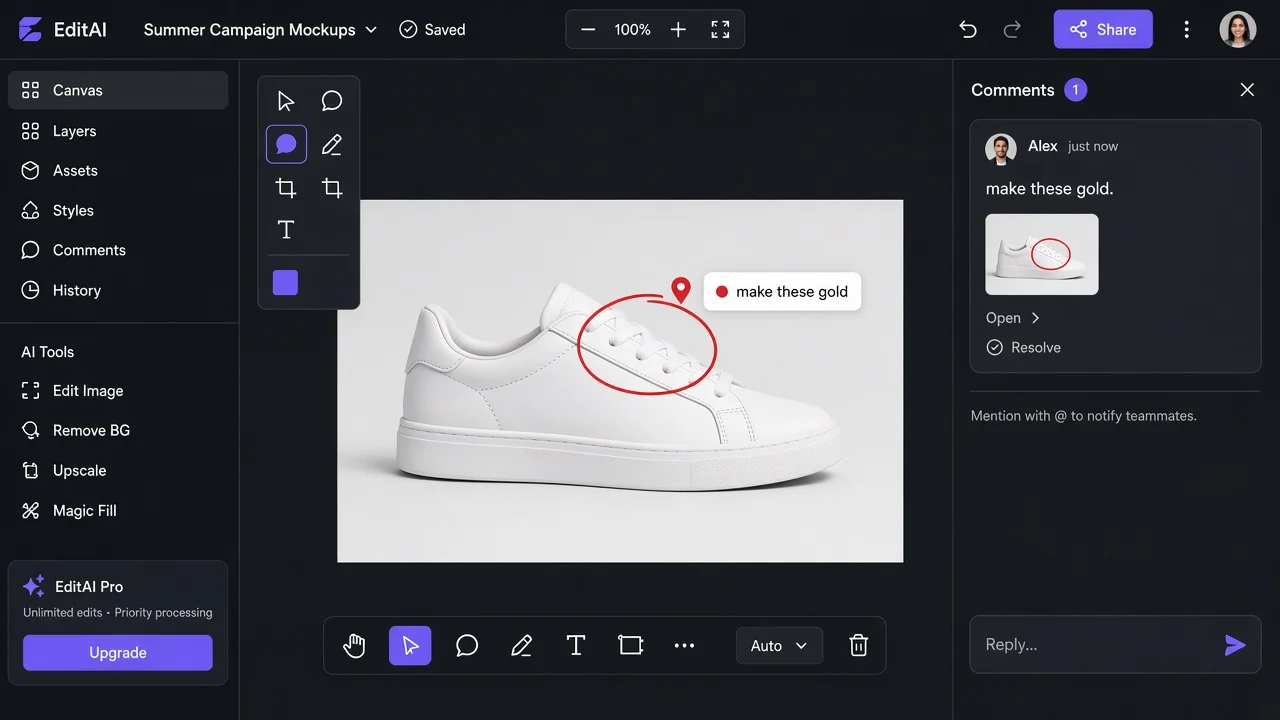
The new editing tools are a separate story from the model itself. Comment-based editing lets you pin a note to a specific region of the image — circle the part you want changed and type what you want — instead of rewriting an entire prompt to describe a small, localized fix. This is the kind of change that sounds incremental until you have spent time writing long-form prompts trying to redirect attention to a single corner of an output. The Sketch tool lets you draw an object you want added; the model interprets the sketch rather than asking you to describe it in words. Prompt templates provide a structured starting point for common request types.
What GPT Image 2.5 Is Good At
The combination of better subject preservation and comment-based editing makes GPT Image 2.5 genuinely strong for iterative creative projects: logo design, branded merchandise mockups, portrait stylization, and any task where you and the model go back and forth across several rounds. The Axios test ran through exactly that workflow — starting with a logo brief, receiving an underwhelming first result, pushing it in a new direction, and eventually iterating to something the team applied to merchandise across tees, tumblers, and lanyards.
For text rendering, ChatGPT Images has been a standout since the 2.0 release, and 2.5 continues that advantage. If your image needs legible copy baked in — a label, a banner, a title card — this is still one of the few models that reliably handles it without distortion.
For consumer-facing tasks in ChatGPT, the distribution is unmatched. Images 2.5 is rolling out to all ChatGPT, ChatGPT Work, and Codex users across every tier and platform. OpenAI reports more than 3 billion images generated weekly across its image products. If the person who needs the output is already inside ChatGPT, the friction to use Images 2.5 is essentially zero.
Where GPT Image 2.5 Still Has Limits
The Arena Image Edit leaderboard, read on September 9, put GPT-Image-2.5 Sunburst at 1520 and Flare at 1491 — meaningfully ahead of Seedream 5.0 Pro (1394) and Nano Banana 2 (1387). But Arena measures which image people prefer at a glance. It does not measure whether a model holds a brand layout consistent across four rounds of edits on a Monday deadline.
-
Multi-reference workflows remain a structural challenge. GPT Image 2.5 can accept a reference image, but tasks that require holding two or more distinct visual references simultaneously — combine this product's color palette with this product's shape, keep both consistent — are still unreliable territory. The model was not built with multi-reference input as its primary design constraint.
-
Free access is rate-limited inside ChatGPT. Casual users can generate images, but the available credits on free tiers run out faster with the higher-quality settings that actually demonstrate the model's improvements. Sunburst, the precision variant, is API-only and not available as a selectable mode in the ChatGPT consumer interface.
-
Commercial licensing in ChatGPT carries OpenAI's standard terms, which apply to all generated content. For teams running e-commerce product workflows or producing marketing assets at volume, the question of what you can commercially publish and under which plan tier is worth checking against OpenAI's current policy before building a pipeline around it.
When to Use imgtoimgai.io Instead
The case for a dedicated image-to-image tool is sharpest when your workflow is structured around a reference image as a constraint, not a starting point.
If you are editing a product photo — changing the background, adjusting the lighting, swapping a surface material, removing an element — the reference image is the source of truth. The output should look like that product, in that adjusted context, not a plausible generalization of it. A tool built specifically for image-to-image workflows handles that constraint differently than a general-purpose assistant that can also do image work.
Multiple reference images are where the structural difference is clearest. imgtoimgai.io supports uploading multiple reference images in a single generation — useful for mixing style references, combining compositional elements, or keeping a character consistent across a batch of variations. That workflow does not map cleanly onto how ChatGPT's image interface is designed.
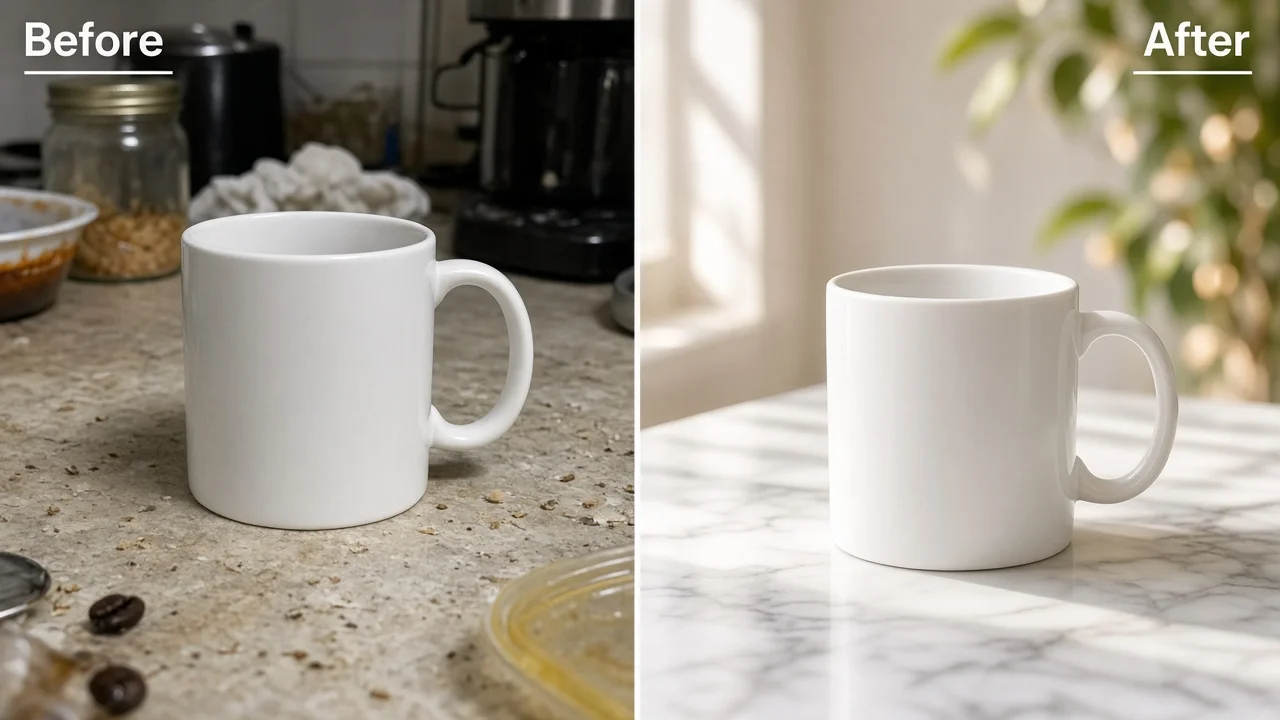
Free access without a subscription is another practical difference. imgtoimgai.io offers a free tier that does not require a paid ChatGPT plan, and the commercial use license is tied to the subscription tier rather than a platform-level policy that applies across all OpenAI products. For e-commerce sellers or content creators who want a focused tool for image transformation — one that does not require navigating a full AI assistant interface — try it free without any signup friction.
Side-by-Side: GPT Image 2.5 vs. imgtoimgai.io
| GPT Image 2.5 | imgtoimgai.io | |
|---|---|---|
| Primary interface | ChatGPT (assistant) | Dedicated image tool |
| Reference image input | Single reference | Multiple references |
| Free tier | Limited credits in ChatGPT | Free with sign-up |
| Commercial use | OpenAI platform terms | Subscription users |
| Sketch/annotation editing | Yes (Sketch tool, comment editing) | Prompt-based |
| Text rendering | Strong | Standard |
| Best for | Iterative creative, logo, portrait stylization | Product photos, multi-ref, batch transformation |
| API access | Flare + Sunburst ($30/M output tokens) | Web-based |
| Mobile | Yes | Yes |
FAQ
Is GPT Image 2.5 free to use?
GPT Image 2.5 is available to all ChatGPT users, including the free tier. However, higher-quality settings and the Sunburst variant (via API) are only accessible on paid plans or through direct API access, which is billed at $30 per million output image tokens.
What is the difference between GPT-Image-2.5 Flare and Sunburst?
Flare is the default variant, optimized for speed — up to 50% faster than GPT Image 2.0 — and suitable for high-volume generation and rapid prototyping. Sunburst is the precision variant, running approximately 1.5–2x slower but delivering tighter consistency for multi-turn editing and production-quality work. Both are priced identically.
When should I use a dedicated image-to-image tool instead of ChatGPT Images 2.5?
If your task starts from a specific reference image that must stay visually anchored — product photography, character consistency across a batch, or combining elements from multiple source images — a tool designed specifically for image-to-image workflows handles that constraint more directly. GPT Image 2.5 excels at iterative creative work inside ChatGPT's assistant interface; a dedicated tool is better when the reference image is the design constraint, not just a starting point.